Fast Entry Calculator
Product Type:
Web App
Roles:
Product Designer
Design Engineer
Tools Used:
Retool
Time period:
06/2025 - Ongoing
Overview
The Fast Entry Calculator was created to simplify how ECM professionals assess IPO eligibility for index inclusion.
Traditionally, analysts manually review prospectuses and built spreadsheets to model potential fast entries. This solution uses AI to extract and pre-fill prospectus data, quickly showing eligibility outcomes and potential index flows. I led the end-to-end design and front-end development on Retool for the product.

Role
Product DesignerDesign Engineer (Retool)

Team
2x Backend engineer
1x Analyst / PM

Company Hackathon
Hackathon win: Developed core MVP in 2-day internal hackathon (awarded first place).
On track to be released to clients by end of 2025.

Project Start

Challenge
Users needed a way to quickly determine if new listings qualified for fast entry into indices and to forecast the passive flows these entries could generate. The tool had to be fast, intuitive, and technically feasible inside Retool. Balancing automation (AI data extraction) with manual control was key to user trust.

Goals
- Create an interface that allows users to edit data extracted from IPO prospectuses using AI.
- Provide clear eligibility tables per index with editable overrides.
- A view for potential index flows from fast entry events to be shown.
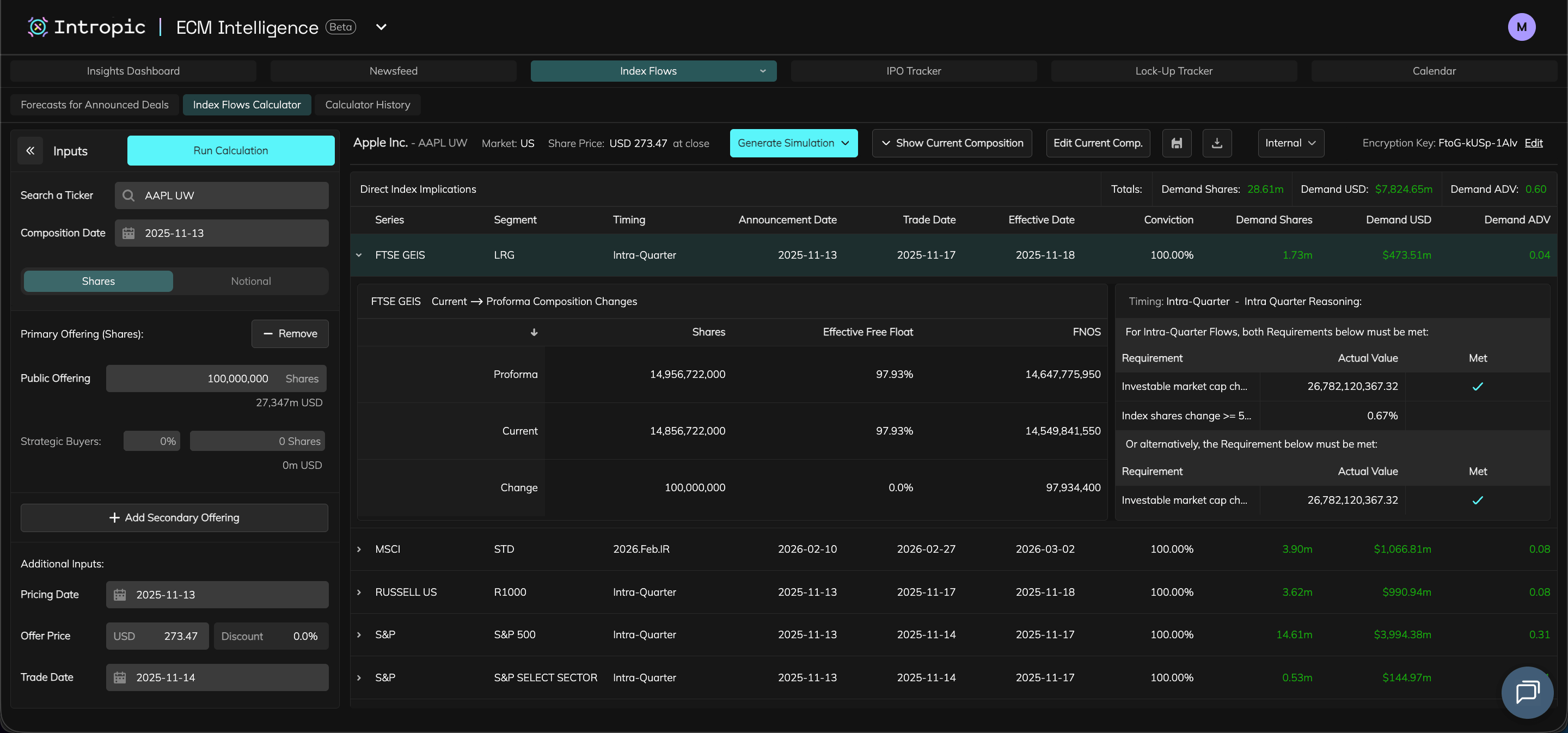
- Maintain UI consistency with Index Flows Calculator.

Constraints
- Retool component limitations required custom HTML/JS workarounds improving the UX of table interactivity.
- Limited time during hackathon (2 days to ship MVP).
- AI data accuracy required human validation and override flows.
- Needed to use existing Index Flows UI patterns for familiarity.

Research & Discovery
- Collaboration with analysts, client team and their analytics tools, and internal stakeholders helped me understand user goals and pain points.
Team Analyst & PM

Quick feedback & tests
- Required fast, clear eligibility output and editable controls for values, overrides and share classes.
Client Team

Reviewed client requests
- Clients wanted automation for prospectus data and ability to share results.
Stakeholders

Review sessions
- Prioritised speed to market and reuse of Index Flows Calculator UX patterns.

User Flow and Required Features
- The Research & Discovery phase helped me put together a user flow and list of necessary features for the product.

Search for a company / ticker

AI scrapes prospectus for values and populates input tables
Optional: edit input table values
Optional: edit share classes

Click ‘Run Calculation’


Calculation table generated for each index

Optional: edit table overrides

‘Re-Run with Overrides’ button shownAND’Clear Overrides’ button is shown
Share Calculation button is shown

Click share Calculation button

Share Calculation modal is shown, user can choose to share by inputing email addresses or uploading a CSV of email addresses


Click ‘Re-Run with Overrides’ button

Calculation tables re-generated for each index
Click ’Clear Overrides’ button
Overrides reset to default
‘View Threshold Requirements’ button shown

Click ‘View Threshold Requirements’ button

Modal appears showing a more detailed view of the requirements needed for fast-entry for each index
‘Fast Entry / Flows’ Toggle appears (set to ‘Fast Entry’ by default)

Click ‘Flows’

View switches to show table of index flows

Required Feature / Component
User need it solves
Input Panel
- Display AI scraped data from company prospectus and allow users to edit this data.
Eligibility Tables
- Show requirements vs calculated values per index and fast entry result.
Threshold Requirements Modal
- Show in depth view of requirements vs calculated values per index.
Overrides
- Allow manual adjustments to refine calculations.
Forecast View
- Display potential index flows from fast entry events.

Design & Iteration
- Used Index Flows Calculator components to build directly into Retool given the time constraint.
- Mirrored familiar UX patterns to reduce iteration time while also improving on interaction and components.
- AI assistance helped prototype data extraction flows and fine-tune table layouts in Retool.

Design Engineering Requirement
The product had to be built in Retool. Designs needed to adhere to its limitations and my developing knowledge of Retool workarounds.
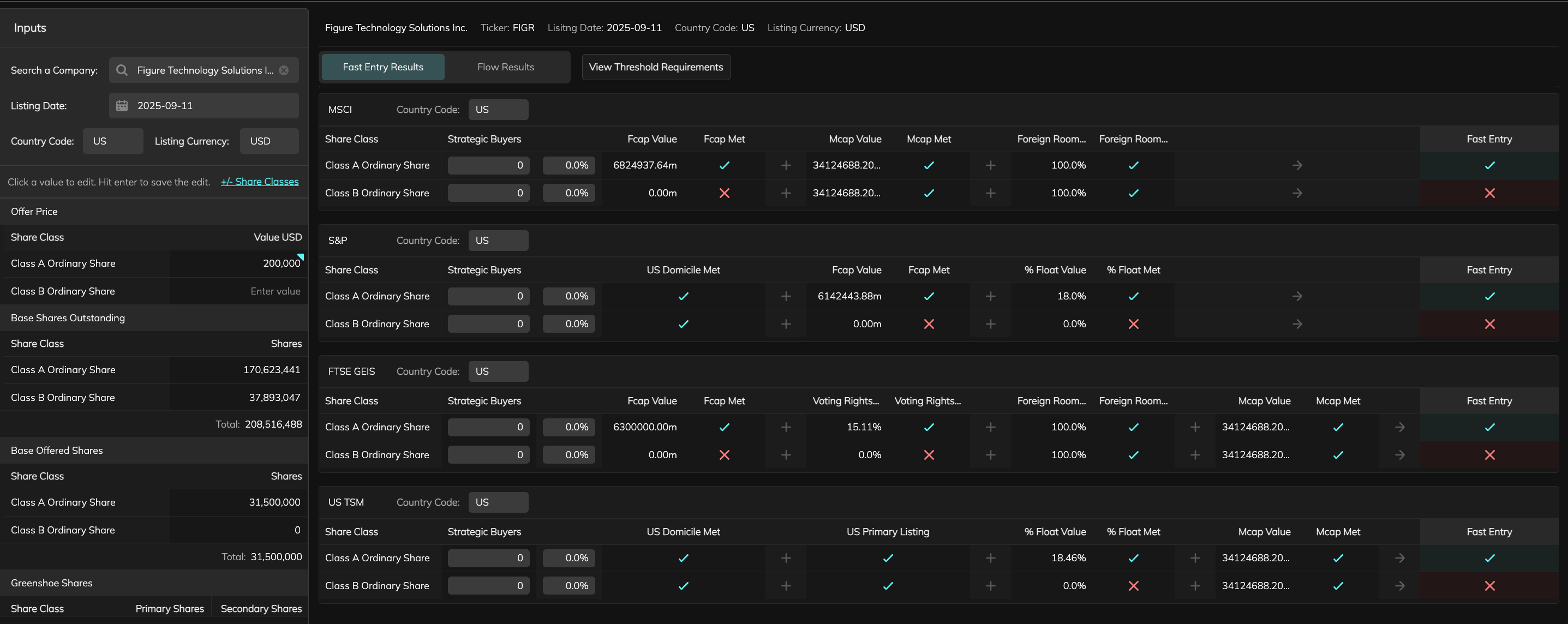
Input Component
- Kept a similar flow and functionality to the component built previously for the Index Flows Calculator for familiarity.
- For this product there were many more editable values to consider, even if these values were pre-populated using AI.
- Using Retool table components allowed for more data to be displayed in a cleaner format, however the UX for saving edits to these tables was not great as the user was required to click a save button after editing each table.
- Using Javascript and connecting queries, I found workarounds to this to ensure edits were quick and easy for users and that data in corresponding fields was dynamic.
Share Class Modal
- Users needed the ability to edit share classes. I used a modal that updates the inputs based on desired Share Classes.
- This flow was slightly altered in cases where data was unavailable for the AI to scrape from, meaning manual entry of data was required from users.
Search for a company / ticker

Company / ticker not found, information modal shown.
Click ‘Add Inputs’
Share Class Modal shown

Add desired Share Classes before continuing
(Class A is pre-populated)
Table Components
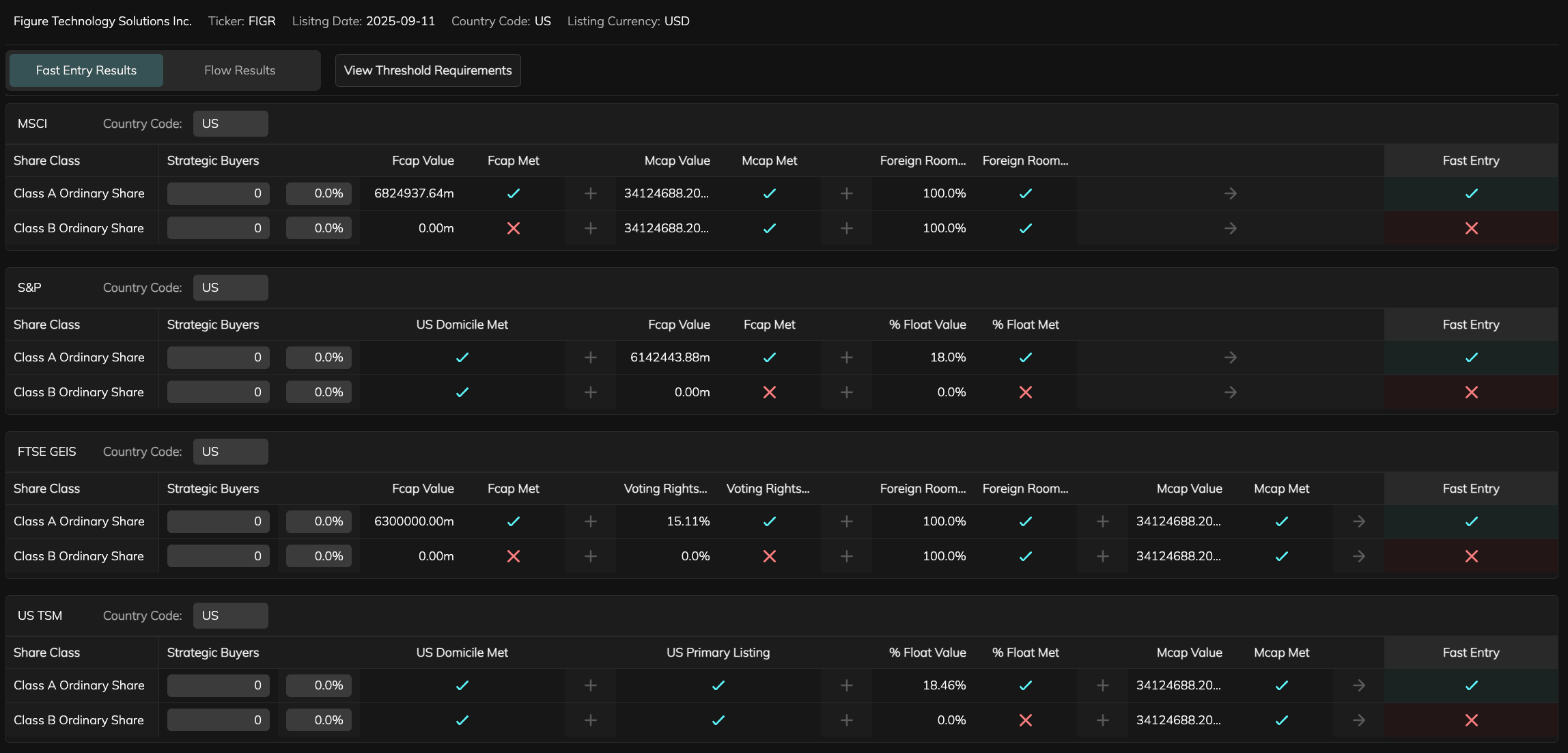
Eligibility Tables
- These tables display each index’s eligibility thresholds such as market cap, float value, and foreign room alongside the company’s calculated values. I designed the table layout for immediate visual validation so users can quickly scan checkmarks and cross icons to see which criteria are met.
- Strategic buyer cells and Company Overrides are interactive, allowing users to edit data points without breaking flow. This design replaced the need for modal pop-ups and reduced clicks.
Flow Results Table
- The Flow Results view summarises potential index demand generated by IPO fast entries.

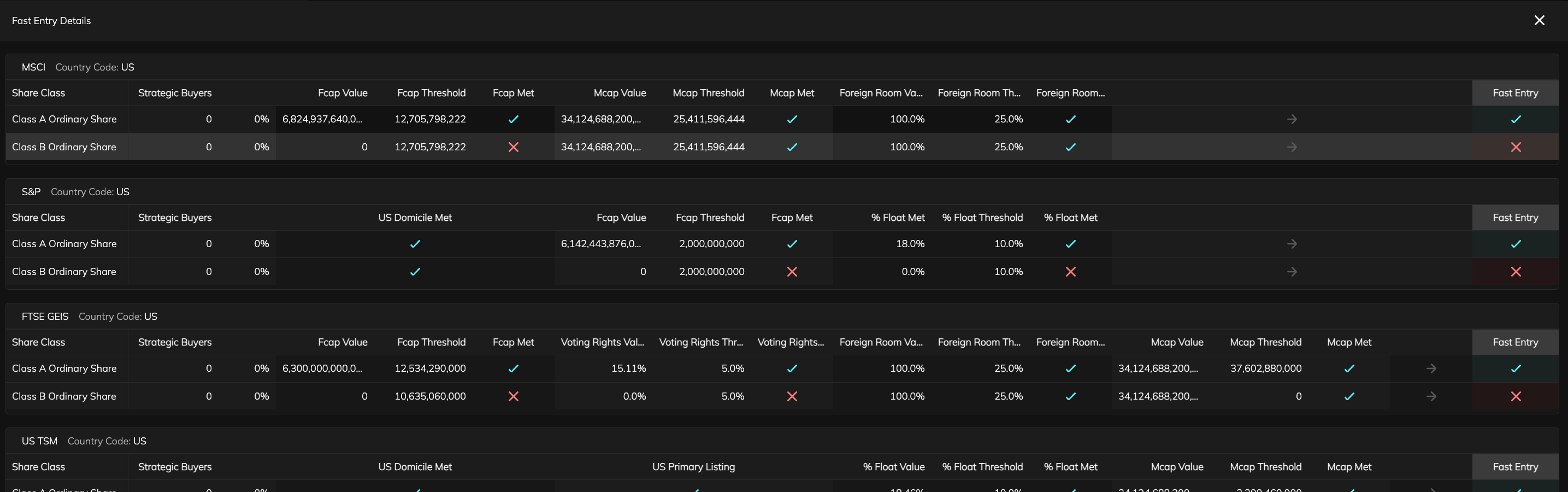
Threshold Requirements Modal / Table (Expanded Table View)
- The expandable table allows users to dive deeper into per-index thresholds and validation logic. It retains the same structure as the main eligibility table but exposes the formula breakdown behind each fast-entry decision.

Implementation & Launch
- Built the production front end in Retool, implementing components with HTML, CSS, and JavaScript while utilising AI-assisted code to accelerate development. A working app had to be ready within 48 hours to present in the company Hackathon.
- Built entire front end in Retool during the hackathon with tweaks and features being added afterwards.
- Used AI-assisted coding to generate custom table behaviours and input validation.
- Integrated API connections with backend forecast services.
Fast Entry Calculator in Production

Outcome & Impact
- Our team won the company Hackathon and delivered a usable and functional MVP to a high standard.
- The tool is going through final refinements and will be launched by the end of 2025.
- Integration into ECM Intelligence was also required and this meant updating the IA slightly.
- Fast Entry was introduced as a new tab in the Index Flows path, sharing its component system and visual language.
- This integration allows users to navigate between the different calculator tools and also meant the Fast Entry Calculator can be integrated into the same share / save workflows as the Index Flows Calculator.

Key Learnings
- AI needs human context. Using AI to extract prospectus data dramatically sped up input setup, but editable overrides were essential to build analyst trust and ensure data accuracy.
- The two-day hackathon forced quick design and technical decisions, proving that strong component foundations and rapid iteration can produce high-quality, production-ready work.
- Reusing the Index Flows Calculator’s patterns made the new tool intuitive for users, reducing onboarding time and increasing adoption.
- If I were to do it again, I wouldn’t mind using Retool to prototype, but I’d push stakeholders and PMs to give the go ahead to build in React or similar as there is more control over UX.
Fast Entry Calculator
Product Type:
Web App
Roles:
Product Designer
Design Engineer
Tools Used:
Retool
Time period:
06/2025 - Ongoing
Overview
The Fast Entry Calculator was created to simplify how ECM professionals assess IPO eligibility for index inclusion.
Traditionally, analysts manually review prospectuses and built spreadsheets to model potential fast entries. This solution uses AI to extract and pre-fill prospectus data, quickly showing eligibility outcomes and potential index flows. I led the end-to-end design and front-end development on Retool for the product.
Role
Product DesignerDesign Engineer (Retool)
Team
2x Backend engineer
1x Analyst / PM
Company Hackathon
Hackathon win: Developed core MVP in 2-day internal hackathon (awarded first place).
On track to be released to clients by end of 2025.
Project Start
Challenge
Users needed a way to quickly determine if new listings qualified for fast entry into indices and to forecast the passive flows these entries could generate. The tool had to be fast, intuitive, and technically feasible inside Retool. Balancing automation (AI data extraction) with manual control was key to user trust.
Goals
- Create an interface that allows users to edit data extracted from IPO prospectuses using AI.
- Provide clear eligibility tables per index with editable overrides.
- A view for potential index flows from fast entry events to be shown.
- Maintain UI consistency with Index Flows Calculator.
Constraints
- Retool component limitations required custom HTML/JS workarounds improving the UX of table interactivity.
- Limited time during hackathon (2 days to ship MVP).
- AI data accuracy required human validation and override flows.
- Needed to use existing Index Flows UI patterns for familiarity.
Research & Discovery
- Collaboration with analysts, client team and their analytics tools, and internal stakeholders helped me understand user goals and pain points.
Team Analyst & PM
Quick feedback & tests
- Required fast, clear eligibility output and editable controls for values, overrides and share classes.
Client Team
Reviewed client requests
- Clients wanted automation for prospectus data and ability to share results.
Stakeholders
Review sessions
- Prioritised speed to market and reuse of Index Flows Calculator UX patterns.
User Flow and Required Features
- The Research & Discovery phase helped me put together a user flow and list of necessary features for the product.
Search for a company / ticker
AI scrapes prospectus for values and populates input tables
Optional: edit input table values
Optional: edit share classes
Click ‘Run Calculation’
Calculation table generated for each index
Optional: edit table overrides
‘Re-Run with Overrides’ button shownAND’Clear Overrides’ button is shown
Share Calculation button is shown
Click share Calculation button
Share Calculation modal is shown, user can choose to share by inputing email addresses or uploading a CSV of email addresses
Click ‘Re-Run with Overrides’ button
Calculation tables re-generated for each index
Click ’Clear Overrides’ button
Overrides reset to default
‘View Threshold Requirements’ button shown
Click ‘View Threshold Requirements’ button
Modal appears showing a more detailed view of the requirements needed for fast-entry for each index
‘Fast Entry / Flows’ Toggle appears (set to ‘Fast Entry’ by default)
Click ‘Flows’
View switches to show table of index flows
Required Feature / Component
User need it solves
Input Panel
- Display AI scraped data from company prospectus and allow users to edit this data.
Eligibility Tables
- Show requirements vs calculated values per index and fast entry result.
Threshold Requirements Modal
- Show in depth view of requirements vs calculated values per index.
Overrides
- Allow manual adjustments to refine calculations.
Forecast View
- Display potential index flows from fast entry events.
Design & Iteration
- Used Index Flows Calculator components to build directly into Retool given the time constraint.
- Mirrored familiar UX patterns to reduce iteration time while also improving on interaction and components.
- AI assistance helped prototype data extraction flows and fine-tune table layouts in Retool.
Design Engineering Requirement
The product had to be built in Retool. Designs needed to adhere to its limitations and my developing knowledge of Retool workarounds.
Input Component
- Kept a similar flow and functionality to the component built previously for the Index Flows Calculator for familiarity.
- For this product there were many more editable values to consider, even if these values were pre-populated using AI.
- Using Retool table components allowed for more data to be displayed in a cleaner format, however the UX for saving edits to these tables was not great as the user was required to click a save button after editing each table.
- Using Javascript and connecting queries, I found workarounds to this to ensure edits were quick and easy for users and that data in corresponding fields was dynamic.
Share Class Modal
- Users needed the ability to edit share classes. I used a modal that updates the inputs based on desired Share Classes.
- This flow was slightly altered in cases where data was unavailable for the AI to scrape from, meaning manual entry of data was required from users.
Search for a company / ticker
Company / ticker not found, information modal shown.
Click ‘Add Inputs’
Share Class Modal shown
Add desired Share Classes before continuing
(Class A is pre-populated)
Table Components
Eligibility Tables
- These tables display each index’s eligibility thresholds such as market cap, float value, and foreign room alongside the company’s calculated values. I designed the table layout for immediate visual validation so users can quickly scan checkmarks and cross icons to see which criteria are met.
- Strategic buyer cells and Company Overrides are interactive, allowing users to edit data points without breaking flow. This design replaced the need for modal pop-ups and reduced clicks.
Flow Results Table
- The Flow Results view summarises potential index demand generated by IPO fast entries.
Threshold Requirements Modal / Table (Expanded Table View)
- The expandable table allows users to dive deeper into per-index thresholds and validation logic. It retains the same structure as the main eligibility table but exposes the formula breakdown behind each fast-entry decision.
Implementation & Launch
- Built the production front end in Retool, implementing components with HTML, CSS, and JavaScript while utilising AI-assisted code to accelerate development. A working app had to be ready within 48 hours to present in the company Hackathon.
- Built entire front end in Retool during the hackathon with tweaks and features being added afterwards.
- Used AI-assisted coding to generate custom table behaviours and input validation.
- Integrated API connections with backend forecast services.
Fast Entry Calculator in Production
Outcome & Impact
- Our team won the company Hackathon and delivered a usable and functional MVP to a high standard.
- The tool is going through final refinements and will be launched by the end of 2025.
- Integration into ECM Intelligence was also required and this meant updating the IA slightly.
- Fast Entry was introduced as a new tab in the Index Flows path, sharing its component system and visual language.
- This integration allows users to navigate between the different calculator tools and also meant the Fast Entry Calculator can be integrated into the same share / save workflows as the Index Flows Calculator.
Key Learnings
- AI needs human context. Using AI to extract prospectus data dramatically sped up input setup, but editable overrides were essential to build analyst trust and ensure data accuracy.
- The two-day hackathon forced quick design and technical decisions, proving that strong component foundations and rapid iteration can produce high-quality, production-ready work.
- Reusing the Index Flows Calculator’s patterns made the new tool intuitive for users, reducing onboarding time and increasing adoption.
- If I were to do it again, I wouldn’t mind using Retool to prototype, but I’d push stakeholders and PMs to give the go ahead to build in React or similar as there is more control over UX.