Lock-Up Tracker
Product Type:
Web App
Roles:
Product Designer
Design Engineer
Tools Used:
Retool
Figma
Time period:
02/2025 - Ongoing
Overview
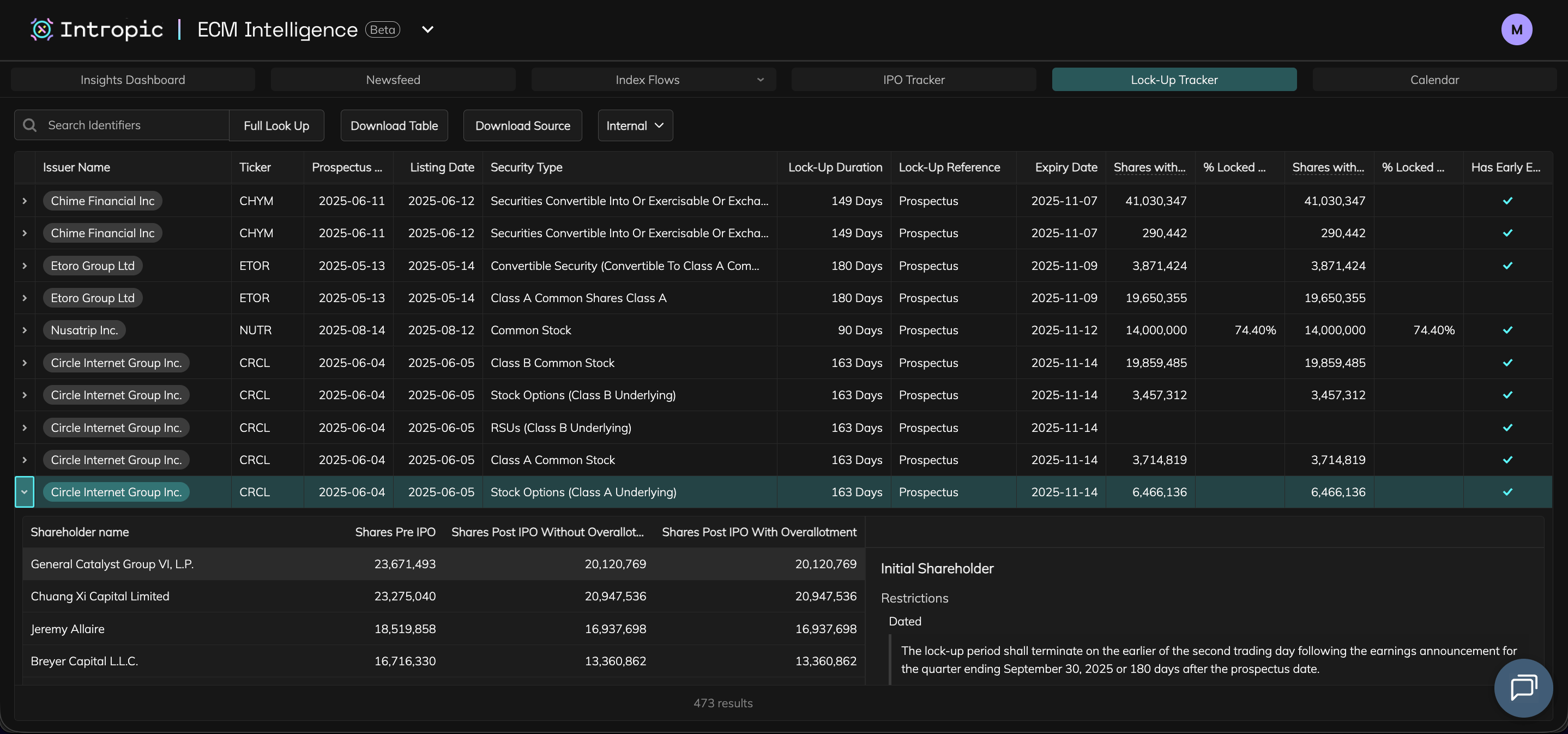
A new feature added to the IPO Intelligence Product. The Lock-Up Tracker helps Equity Capital Markets professionals monitor post-IPO share lock-ups, including expiry dates, early-release clauses, and entity-specific restrictions.
I designed and implemented the front end in Retool, collaborating with backend engineers who used AI to extract and structure lock-up data directly from IPO prospectuses. The tool gives users an at-a-glance view of upcoming expiries with the ability to explore shareholder-level and clause-level details.

Role
Product DesignerDesign Engineer (Retool)

Team
2x Backend engineer / PM
2x Analysts

Users
24 active repeat users in the month of October 2025

Project Impact
Increased usage and adoption. Beta in active client use

Outcome & Impact
Quarterly Repeated Usage Metrics as of October 2025
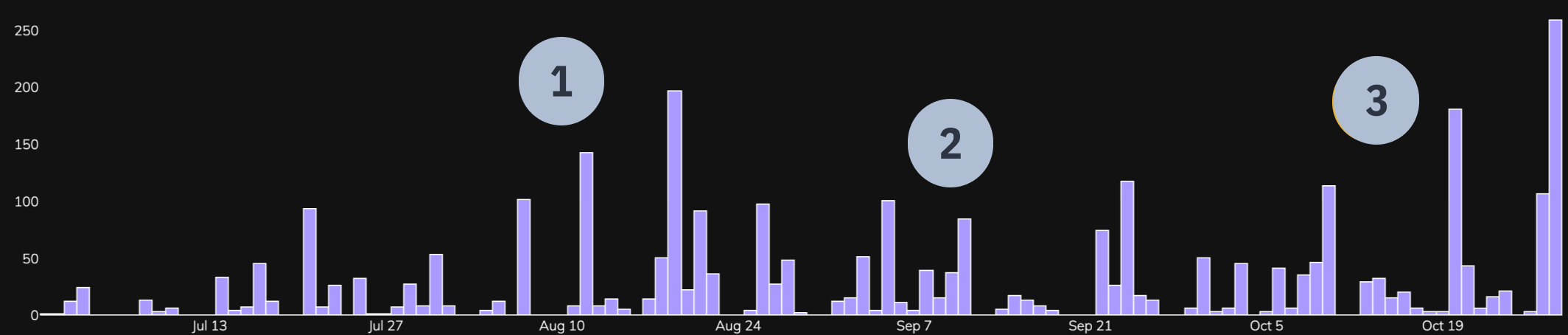
1
Lock-Up Tracker is released as part of IPO Intelligence and usage of the product creeps up.
2
Average usage higher than previously, spiking when Lock-Ups become relevant.
3
Usage increases further when IPO Intelligence in incorporated into the ECM Intelligence platform.

Project Start

Challenge
Lock-up data lives deep within legal prospectuses and is time consuming to analyse thoroughly. Analysts had to manually track expiry schedules, shareholder classes, and early-release clauses in spreadsheets. The challenge was to design an experience that consolidated this data into a structured system, providing transparency across shareholders, entity types, condition and restriction clauses.

Goals
- Centralise all lock-up data into a single main dashboard.
- Provide shareholder level visibility with expiry dates and restriction conditions.
- Display early-release clauses and in a clear and digestible way.
- Improve usability and drive adoption for the IPO Intelligence product.
- Maintain clarity and consistency across dense legal data.

Constraints
- Working with continuously AI parsed data meant constantly updating designs when edge cases appeared.
- Tight MVP deadlines under a startup velocity.
- Needed to iterate quickly while maintaining UX clarity for complex datasets.

Research & Discovery
- Collaboration with analysts, client team and their analytics tools, and internal stakeholders helped me understand user goals and pain points.
Internal ECM Analysts

Conducted research sessions
- Analysts needed an aggregated view of upcoming expiries and granular detail for deeper analysis

Prototype testing
- Dense text from prospectuses had to be presented in structured, comparable formats for usability.
Client Team / Analytics Tools

Client query and request analysis
- Clients often requested early-release visibility and entity-type breakdowns.
Feedback post launch
- Feedback highlighted the need for better filtering and additional data.
Stakeholders

Weekly product review sessions
- Helped to keep product on track and focus on business goals / feature priorities.

User Flow / Information Architecture & Required Features
- The Research & Discovery phase helped me put together a user flow and list of necessary features for the product.
User Flow / Information Architecture Overview

Lock-Up Tracker Table

Click Row

Company View is shown with Shareholder tab selected by default
Share Calculation button is shown

Click share Calculation button
Share Calculation button is shown
Click share Calculation button


Shareholder table is shown

Click a shareholder row
Shareholder Details modal appears
Lock-Up Details Component appears, pre-filtered for the selected rows entity type
Click ‘Deal’

Switch to company IPO Deal view
Click ‘Lock-Up’
Switch to company Lock-Up view
Entity Type Table appears (first row selected by default)
Shareholder Details modal appears (data filtered for the selected row of Entity Type Table)
Click a different row in the Entity Type Table
Shareholder Details modal shows data for the newley selected entity type
Expand Row

Row expands to reveal a shareholder table (first row selected by default) and lock-up restrictions and conditions for that selected shareholder

Click a different shareholder in the list
Restrictions and conditions updates to reflect the selected shareholders data

Required Feature / Component
User need it solves
Lock-Up Tracker Table
- Show companies with upcoming expiries, broken down by share class type.
Shareholder View
- Display each shareholder, share class, expiry date, and restriction details.
Shareholder Modal
- Display each detailed data per shareholder.
Lock-Up View
- Show clauses, restriction types, and early-release conditions per entity.
Search & Filtering
- Enable quick look-up by company, expiry date, or entity type.
Lock-Up Expiry Component
- Show an overview of a Lock-Up, its restrictions and conditions, and a standardised view of the data parsed by AI.

Design & Iteration
- Table components and hierarchical data exploration were central to the Lock-Up Tracker’s UX.
- Used Figma and Retool to design progressive disclosure flows ensuring users could explore data without cognitive overload.
- Iterated closely with analysts, refining table hierarchies, filters, and states to make complex lock-up structures understandable at a glance.
- Each table level was built as a separate component in Retool and connected through state logic and shared parameters.

Design Engineering Requirement
The product had to be built in Retool. Designs needed to adhere to its limitations and my developing knowledge of Retool workarounds.

More features have been added since launch (buttons for these may be visible in the below videos) however they are not shown in depth.
Lock-Up Tracker Table early design in Figma
- Initial designs based on data that PM and Stakeholder thought was valuable.
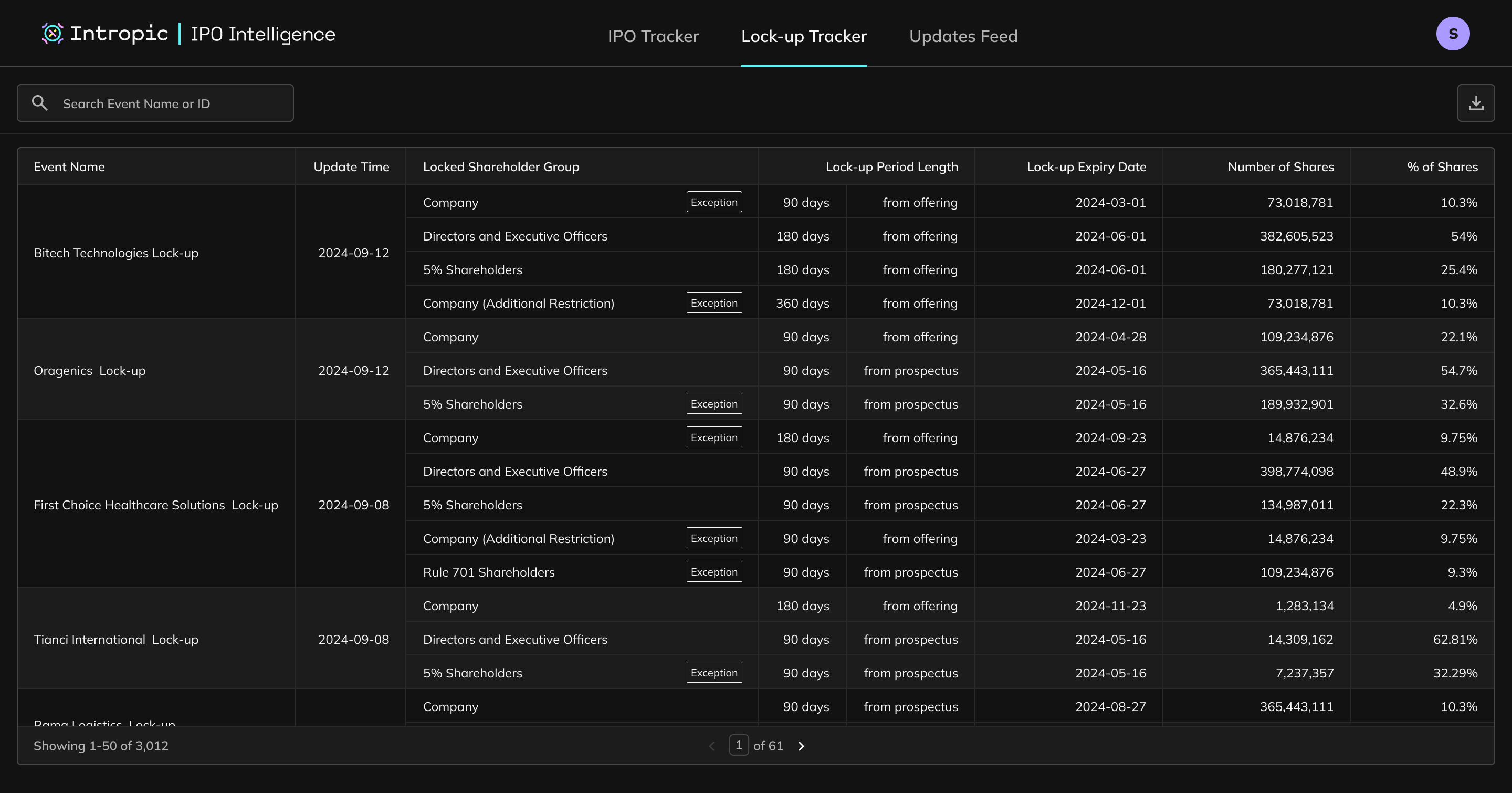
Lock-Up Tracker Table updated design in Retool
- Designs progressed based on more user testing and client requests.
- Displays upcoming lock-ups, broken down by share-class type.
- Users can expand a row for a preview of shareholder restrictions or click through to a detailed company view.
Due to the need to work at velocity, some components were wireframed & prototyped using Retool.
Shareholder Tab (Company View) design in Retool
- The Shareholder tab lists share quantities, percentages, and expiry data for each shareholder.
- Clicking a shareholder opens detailed lock-up data in the Shareholder Modal. This modal contains a Lock-Up Details component which shows:
- Overview
- Restrictions & Conditions - parsed text from prospectuses and normalised for consistency.
- Early-Release Conditions - structured triggers for early expiry events.
Deal Tab (Company View) early design in Figma
- Provides IPO overview and visualised context linking lock-ups to offering data. Designed based on analyst needs to display all requested data.
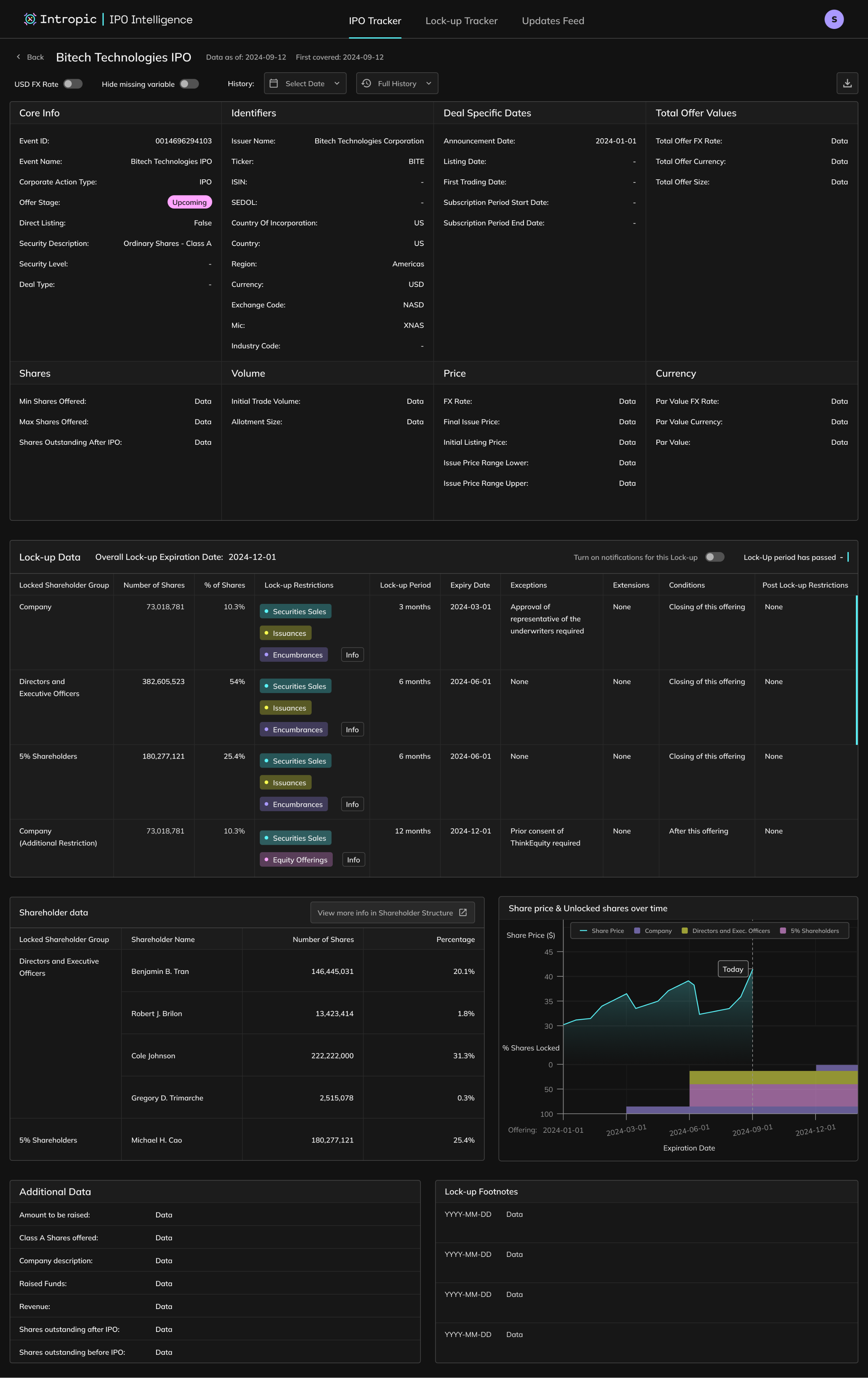
Deal Tab (Company View) updated design in Retool
- Scope and data was trimmed down to show most useful data in the context of an IPO ‘Deal’ with the rest of the data split in different tabs to avoid overwhelming users with too much data on one screen.
Lock-Up Tab (Company View) design in Retool
- Uses the same Lock-Up Details component in the Shareholder Modal but controlled by the selected row of the Entity Types Table.
- Selecting an entity type filters and displays its specific expiry conditions, restrictions and clauses.

Implementation & Launch
- Built the production front end in Retool, implementing components with HTML, CSS, and JavaScript while utilising AI-assisted code to accelerate development. Delivered production-ready UI and handled QA for front-end flows.
- Backend engineers integrated AI-extracted data through API queries while I validated and formatted this data in-app for consistency.
- After internal testing, the product launched in beta as part of IPO Intelligence, and was later incorporated into ECM Intelligence, where it continues to see strong user adoption and feedback.

Key Learnings
- Showing clause-level data and full restriction text improved analyst confidence.
- Consistent layouts made AI-parsed text usable and readable.
- Tiered tables allowed users to explore complex data without feeling overwhelmed.
- A I would improve would be introducing a timeline visual alongside tables to give temporal context to expiry dates and clauses.
Lock-Up Tracker
Product Type:
Web App
Roles:
Product Designer
Design Engineer
Tools Used:
Retool
Figma
Time period:
02/2025 - Ongoing
Overview
A new feature added to the IPO Intelligence Product. The Lock-Up Tracker helps Equity Capital Markets professionals monitor post-IPO share lock-ups, including expiry dates, early-release clauses, and entity-specific restrictions.
I designed and implemented the front end in Retool, collaborating with backend engineers who used AI to extract and structure lock-up data directly from IPO prospectuses. The tool gives users an at-a-glance view of upcoming expiries with the ability to explore shareholder-level and clause-level details.
Role
Product DesignerDesign Engineer (Retool)
Team
2x Backend engineer / PM
2x Analysts
Users
24 active repeat users in the month of October 2025
Project Impact
Increased usage and adoption. Beta in active client use
Outcome & Impact
Quarterly Repeated Usage Metrics as of October 2025
1
Lock-Up Tracker is released as part of IPO Intelligence and usage of the product creeps up.
2
Average usage higher than previously, spiking when Lock-Ups become relevant.
3
Usage increases further when IPO Intelligence in incorporated into the ECM Intelligence platform.
Project Start
Challenge
Lock-up data lives deep within legal prospectuses and is time consuming to analyse thoroughly. Analysts had to manually track expiry schedules, shareholder classes, and early-release clauses in spreadsheets. The challenge was to design an experience that consolidated this data into a structured system, providing transparency across shareholders, entity types, condition and restriction clauses.
Goals
- Centralise all lock-up data into a single main dashboard.
- Provide shareholder level visibility with expiry dates and restriction conditions.
- Display early-release clauses and in a clear and digestible way.
- Improve usability and drive adoption for the IPO Intelligence product.
- Maintain clarity and consistency across dense legal data.
Constraints
- Working with continuously AI parsed data meant constantly updating designs when edge cases appeared.
- Tight MVP deadlines under a startup velocity.
- Needed to iterate quickly while maintaining UX clarity for complex datasets.
Research & Discovery
- Collaboration with analysts, client team and their analytics tools, and internal stakeholders helped me understand user goals and pain points.
Internal ECM Analysts
Conducted research sessions
- Analysts needed an aggregated view of upcoming expiries and granular detail for deeper analysis
Prototype testing
- Dense text from prospectuses had to be presented in structured, comparable formats for usability.
Client Team / Analytics Tools
Client query and request analysis
- Clients often requested early-release visibility and entity-type breakdowns.
Feedback post launch
- Feedback highlighted the need for better filtering and additional data.
Stakeholders
Weekly product review sessions
- Helped to keep product on track and focus on business goals / feature priorities.
User Flow / Information Architecture & Required Features
- The Research & Discovery phase helped me put together a user flow and list of necessary features for the product.
User Flow / Information Architecture Overview
Lock-Up Tracker Table
Click Row
Company View is shown with Shareholder tab selected by default
Share Calculation button is shown
Click share Calculation button
Share Calculation button is shown
Click share Calculation button
Shareholder table is shown
Click a shareholder row
Shareholder Details modal appears
Lock-Up Details Component appears, pre-filtered for the selected rows entity type
Click ‘Deal’
Switch to company IPO Deal view
Click ‘Lock-Up’
Switch to company Lock-Up view
Entity Type Table appears (first row selected by default)
Shareholder Details modal appears (data filtered for the selected row of Entity Type Table)
Click a different row in the Entity Type Table
Shareholder Details modal shows data for the newley selected entity type
Expand Row
Row expands to reveal a shareholder table (first row selected by default) and lock-up restrictions and conditions for that selected shareholder
Click a different shareholder in the list
Restrictions and conditions updates to reflect the selected shareholders data
Required Feature / Component
User need it solves
Lock-Up Tracker Table
- Show companies with upcoming expiries, broken down by share class type.
Shareholder View
- Display each shareholder, share class, expiry date, and restriction details.
Shareholder Modal
- Display each detailed data per shareholder.
Lock-Up View
- Show clauses, restriction types, and early-release conditions per entity.
Search & Filtering
- Enable quick look-up by company, expiry date, or entity type.
Lock-Up Expiry Component
- Show an overview of a Lock-Up, its restrictions and conditions, and a standardised view of the data parsed by AI.
Design & Iteration
- Table components and hierarchical data exploration were central to the Lock-Up Tracker’s UX.
- Used Figma and Retool to design progressive disclosure flows ensuring users could explore data without cognitive overload.
- Iterated closely with analysts, refining table hierarchies, filters, and states to make complex lock-up structures understandable at a glance.
- Each table level was built as a separate component in Retool and connected through state logic and shared parameters.
Design Engineering Requirement
The product had to be built in Retool. Designs needed to adhere to its limitations and my developing knowledge of Retool workarounds.
More features have been added since launch (buttons for these may be visible in the below videos) however they are not shown in depth.
Lock-Up Tracker Table early design in Figma
- Initial designs based on data that PM and Stakeholder thought was valuable.
Lock-Up Tracker Table updated design in Retool
- Designs progressed based on more user testing and client requests.
- Displays upcoming lock-ups, broken down by share-class type.
- Users can expand a row for a preview of shareholder restrictions or click through to a detailed company view.
Due to the need to work at velocity, some components were wireframed & prototyped using Retool.
Shareholder Tab (Company View) design in Retool
- The Shareholder tab lists share quantities, percentages, and expiry data for each shareholder.
- Clicking a shareholder opens detailed lock-up data in the Shareholder Modal. This modal contains a Lock-Up Details component which shows:
- Overview
- Restrictions & Conditions - parsed text from prospectuses and normalised for consistency.
- Early-Release Conditions - structured triggers for early expiry events.
Deal Tab (Company View) early design in Figma
- Provides IPO overview and visualised context linking lock-ups to offering data. Designed based on analyst needs to display all requested data.
Deal Tab (Company View) updated design in Retool
- Scope and data was trimmed down to show most useful data in the context of an IPO ‘Deal’ with the rest of the data split in different tabs to avoid overwhelming users with too much data on one screen.
Lock-Up Tab (Company View) design in Retool
- Uses the same Lock-Up Details component in the Shareholder Modal but controlled by the selected row of the Entity Types Table.
- Selecting an entity type filters and displays its specific expiry conditions, restrictions and clauses.
Implementation & Launch
- Built the production front end in Retool, implementing components with HTML, CSS, and JavaScript while utilising AI-assisted code to accelerate development. Delivered production-ready UI and handled QA for front-end flows.
- Backend engineers integrated AI-extracted data through API queries while I validated and formatted this data in-app for consistency.
- After internal testing, the product launched in beta as part of IPO Intelligence, and was later incorporated into ECM Intelligence, where it continues to see strong user adoption and feedback.
Key Learnings
- Showing clause-level data and full restriction text improved analyst confidence.
- Consistent layouts made AI-parsed text usable and readable.
- Tiered tables allowed users to explore complex data without feeling overwhelmed.
- A I would improve would be introducing a timeline visual alongside tables to give temporal context to expiry dates and clauses.